Troubleshoot a Japanese name field
Katakana name rejected?
You already have your name in Katakana, but the form says 全角カナで入力してください. Keep the reading you use and check the width, separators and marks one at a time.
Format my kana spellingYour name is in Katakana, yet the form still rejects it. Check the error message against the character-width, space and middle-dot examples below.
Match the correction to the error
Read the error alongside the example beside the field. 全角カナ means full-width Katakana; 半角カナ asks for half-width. A field marked ひらがな asks for Hiragana. Change one setting, then check the result.
Find the instruction and compare the result
These examples keep an existing reading. Change separators only when the form asks for it.
| Instruction or symptom | Before | Example result | Check |
|---|---|---|---|
| Full-width Katakana | ジョン | ジョン | Keep the voicing mark and small ョ |
| Half-width Katakana | ガ | ガ | The voicing mark has its own code point |
| Hiragana | ジョン | じょん | Small ョ becomes small ょ |
| Error at a long vowel | リー / リ- | リー | Use the long-vowel mark ー |
| Middle dot not accepted | ジョン・スミス | ジョンスミス | Remove only the disallowed separator |
| Separate surname and given name | ジョン・スミス | Surname: スミス; given name: ジョン | Follow the labels |
| Leading or trailing spaces | 「 ジョン 」 | 「ジョン」 | The brackets show the boundaries |
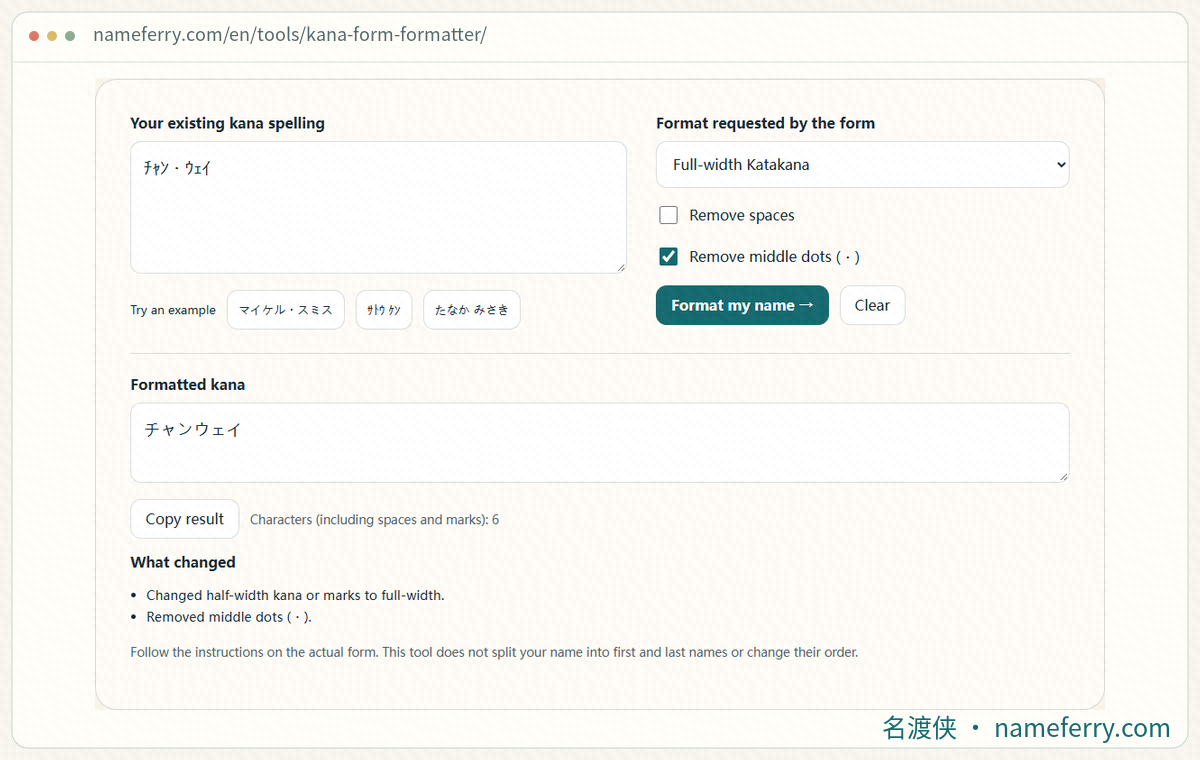
Format an existing kana spelling in NameFerry, adjusting script, character width and separators to fit the destination form.
Convert the voicing marks with the kana
ガ and ガ represent the same kana sound using different character sequences. Converting ガ to full-width should give ガ. Replacing it with カ loses the voicing. Keep the mark in パ / パ too.
Choose the width in the formatter, then inspect small kana. ジョン contains a small ョ; ジヨン has a full-size ヨ and a different sound sequence.
Keep long vowels and check lookalike dashes
リー uses ー to mark a long vowel. A keyboard hyphen (-) and an em dash (—) are different characters. If the spelling uses a long vowel, replace a mistyped dash with ー. Its half-width counterpart is ー.
Keep the long vowel when checking a length limit. Removing it changes the reading.
Handle spaces, middle dots and name boundaries
ジョン・スミス uses ・ between name parts. Follow the example if spaces are accepted; remove the dot when separators are prohibited. For separate surname and given-name fields, put スミス and ジョン in the matching boxes.
The formatter trims outer whitespace and reduces repeated internal whitespace to one ordinary space. Choose removal of spaces or middle dots only after checking the destination field.
Retype a suspicious part of pasted text
A name copied from a message, PDF or webpage may include a line break, tab or invisible character. Remove outer whitespace first. If the error remains, retype the affected part with a Japanese input method, or enter the whole spelling again.
If the formatter reports other characters, inspect the pasted text. Keep the original nearby to compare small kana, voicing and long vowels.
Check the count after choosing the format
ガ is one code point; ガ contains two. A form may count characters, code points or bytes. The displayed length can therefore increase after a conversion to half-width.
Use the required format before checking the destination counter. For a long name, look for full-name notes, an additional field or the service’s instructions for names exceeding its limit.
An official example: the submission method matters
Japan Pension Service guidance, updated on 19 October 2026, distinguishes submission methods for kana fields when registering a new foreign employee name. It specifies full-width for direct entry in an e-Gov single-record form, and half-width for CSV attachments and its filing program.
That rule belongs to this service and filing situation. Check the instructions again when moving to another website.
Three checks before submitting
Script and width match the field.
Voicing, small kana and long vowels are intact.
Surname, given name, separators and length match the instructions.
Character and formatting references
More help with Japanese name spellings
How do you read a Chinese name in Japanese?
Compare the characters and Japanese readings of a Chinese name.
How to fill in Furigana with a Chinese name
Distinguish name, Furigana, Hiragana and Roman-letter fields.
Does the family name or given name come first?
Match family and given names with common Japanese and English field labels.
How to write a Chinese name in Japanese Katakana
Compare Japanese readings, Mandarin pronunciation and the available Kana formats.
Save your name’s furigana in Chrome
Save a phonetic name in Chrome and check script, family-name splitting and returning old suggestions.
How to fill in address furigana: numbers, buildings and where to start
Work out which address segment needs kana and where the numbers and building belong.
Format the kana spelling you already use
Paste your reading, choose full-width, half-width or Hiragana, then adjust spaces and dots as required.